![Best Workflow Automation Softwares in 2026 [Pros & Cons]](https://cxzfdbvutcaszjrxmklh.supabase.co/storage/v1/object/public/blog-assets/covers/1777447171882.png)
Best Workflow Automation Softwares in 2026 [Pros & Cons]
Workflow automation software is no longer only about saving a few clicks. For many teams, the real question is how to move work across apps, people, data, and approvals without losing context along the way.
The hard part is choosing the right type of tool. Some workflows only need a simple trigger and action. Others need visual branching, database-backed operations, RPA, or AI workflow automation software that can understand messy inputs and draft useful outputs.
Start with the work itself: what begins the process, what decisions happen in the middle, who approves the output, and how much context the system needs to carry forward.
What Is Workflow Automation Software?
Workflow automation software connects apps, data, rules, and people so recurring work can move with less manual effort. A simple workflow might turn a form submission into a CRM lead and a team notification. A more advanced workflow might read a support request, classify it, route it, and prepare a reply for review.
There are three useful layers:
✔️ Rule-based automation follows fixed triggers and conditions.
✔️ AI workflow automation adds classification, extraction, summarization, or drafting.
✔️ AI agent workflow automation can use tools and context across multiple steps.
That last layer is where the difference between chat and execution becomes important. A chatbot mainly replies; an agent can keep working toward a goal. MyClaw covers this broader distinction in its guide to AI agents vs. chatbots.
For most teams, the decision is not "automation or AI." It is which layer of automation the workflow actually needs.
Best Workflow Automation Software Categories in 2026
There is no single best workflow automation software for everyone. Compare products by use case: broad SaaS automation, private agent workflows, visual workflow building, self-hosted automation, Microsoft workflows, operational databases, RPA, and enterprise iPaaS.
1. Zapier: Best Broad SaaS App Connector for Fast Trigger-Action Automations
 Zapier is still the easiest mainstream choice for fast app-to-app automation. Its strength is breadth: it connects a very large SaaS ecosystem and lets non-technical users build simple Zaps without thinking like engineers.
Use Zapier for lead routing, marketing alerts, form submissions, calendar updates, spreadsheet syncs, and simple cross-app workflows. Its AI features help with summaries, drafts, and classifications, but Zapier is still strongest when the path is known in advance. Skip it when the workflow needs deep branching, custom code, self-hosting, or very high execution volume.
Pros:
✅ Broad app coverage
✅ Fast setup
✅ Beginner-friendly workflow builder
Cons:
❌ Less flexible for complex branching
❌ Limited custom logic
❌ Less ideal for high-volume workflows
2. MyClaw: Managed OpenClaw Hosting for Private, Always-On AI Agent Workflows
 MyClaw belongs near the top of this list because it solves a different workflow problem from Zapier or Make. Traditional automation tools connect predefined steps. MyClaw is managed OpenClaw hosting for people who want a private, always-on AI assistant that can use skills, tools, files, and context over time.
That matters when the work is not just "move data from app A to app B." A weekly operations report, content workflow, inbox triage routine, research summary, or development workflow often needs context, judgment, and repeated instructions. OpenClaw can support that kind of agent workflow, but self-hosting it means managing setup, uptime, updates, security, and troubleshooting. MyClaw takes the infrastructure burden out of that path. For teams doing AI agent workflow automation software development, it is most useful when the goal is to run an OpenClaw workflow environment without building every operational layer from scratch.
How to Start Automate Your Workflow With MyClaw:
Step 1: Pick one recurring workflow and define its inputs, such as inbox messages, CRM records, project tracker updates, notes, or source files.
Step 2: Turn the repeated instructions into an OpenClaw skill with clear inputs, outputs, file naming rules, approval points, and boundaries.
Step 3: Run the skill through MyClaw, review the output, and repeat it on demand or on a schedule once the workflow is reliable.
MyClaw is not the simplest tool for a basic trigger-action automation. It makes more sense when the workflow benefits from a persistent agent. For managed OpenClaw, VPS, and self-hosting tradeoffs, read the MyClaw guide to best OpenClaw hosting.
Pros:
✅ Private always-on OpenClaw environment
✅ Strong fit for recurring agent workflows
✅ Less infrastructure maintenance
Cons:
❌ More than needed for simple app connectors
3. Make: Best Visual Scenario Builder for Branching No-Code Workflows
 Make is the better fit when a workflow needs visual control. It uses scenarios on a canvas, so branching, filtering, routing, iterating, and data transformation are easier to see.
Use Make for ecommerce order flows, campaign operations, enrichment steps, multi-branch approvals, and workflows where the same input can move through different paths. AI steps can classify a lead before routing it or generate a draft before review. Skip Make when the team wants the simplest beginner experience or needs self-hosted control.
Pros:
✅ Visual workflow design
✅ Strong branching logic
✅ Better data-flow visibility than many linear tools
Cons:
❌ Complex scenarios still need careful design
❌ Less suitable for teams that want self-hosted control
4. n8n: Best Self-Hostable Node-Based Workflow Automation for Technical Teams
 n8n is one of the strongest choices for technical teams. It provides a node-based editor, API connections, custom code, self-hosting, and AI workflow building.
Use n8n for internal tools, custom API pipelines, data operations, AI routing, and workflows where self-hosting or data control matters. It is especially useful when LLM calls, memory, tools, and structured workflow logic need to work together. Skip it when the team does not want to own hosting, upgrades, monitoring, security, or debugging.
Pros:
✅ Self-hostable
✅ Developer-friendly
✅ Strong for custom APIs and AI workflow logic
Cons:
❌ Requires more technical ownership
❌ More maintenance around hosting, security, and upgrades
5. Microsoft Power Automate: Best Microsoft 365 Cloud Flows and Desktop RPA
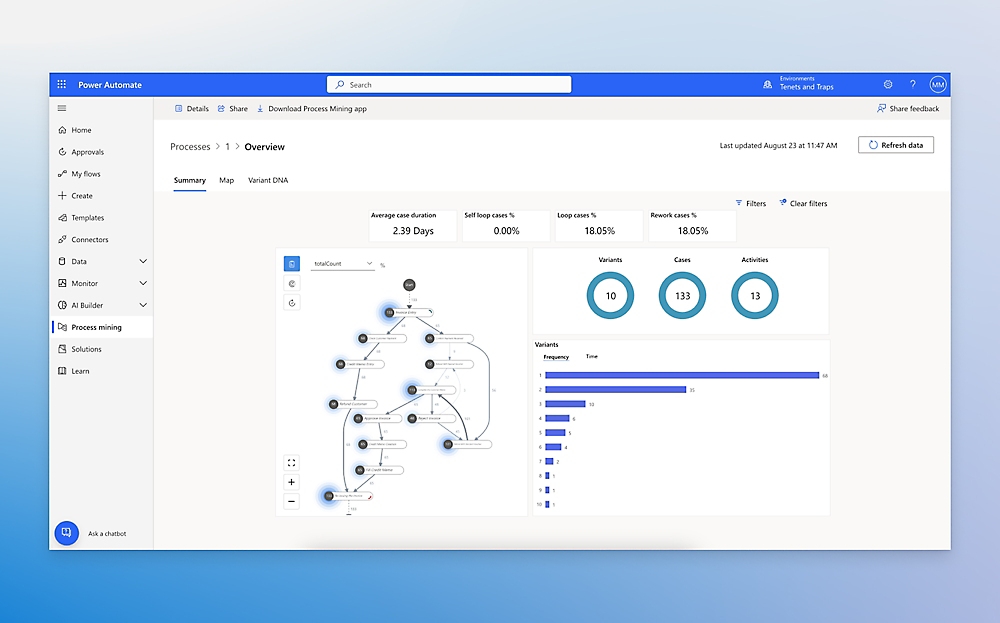
Use it for approval workflows, document routing, Outlook and Teams automations, SharePoint processes, Power Platform workflows, and legacy desktop tasks. Skip it when the team mostly uses non-Microsoft tools and needs a simpler cross-app connector.
Pros:
✅ Strong Microsoft 365 integration
✅ Useful for approvals and document workflows
✅ Supports desktop automation
Cons:
❌ Less compelling for teams that mostly use non-Microsoft SaaS tools
❌ Can feel heavy for simple cross-app automations
6. Airtable: Best Database-Backed Workflow App Builder With AI Assistants
 Airtable is best when the workflow needs a living operational database, not just a connector. It combines spreadsheet-like records, interfaces, automations, and AI assistants around structured work.
Use Airtable for marketing calendars, product operations, content pipelines, recruiting workflows, internal approvals, and project databases. Its AI features are useful for summarizing records, enriching fields, drafting content, and turning structured data into workflow actions. Skip it when the workflow does not need a shared database.
Pros:
✅ Combines database, interface, automation, and AI features
✅ Strong for structured operational workflows
✅ Easy for teams to view and update records
Cons:
❌ Strongest when Airtable is the operating base
❌ Less useful when the workflow does not need a shared database
7. UiPath: Best RPA and Agentic Automation Control Plane for Enterprise UI Workflows
 UiPath is the enterprise pick for RPA and agentic automation. It is built for companies with legacy systems, desktop workflows, high-volume operations, and processes where robots, AI agents, and humans need to work together.
Use UiPath for claims processing, finance operations, healthcare administration, application testing, data entry, and legacy UI workflows. Skip it when the team only needs lightweight SaaS automation.
Pros:
✅ Strong RPA depth
✅ Enterprise controls
✅ Good fit for legacy UI and high-volume processes
Cons:
❌ Too heavy for lightweight SaaS automation
❌ Usually more than small teams need
8. Workato: Best Enterprise iPaaS and Agentic Orchestration for Governed Business Processes
 Workato belongs in the enterprise iPaaS category. It connects applications, data, APIs, and AI agents into governed business workflows.
Use Workato for revenue operations, finance workflows, HR operations, IT service processes, enterprise search, and cross-department orchestration. It makes sense when AI agents need safe access to business systems under governance. Skip it when the buyer wants a cheap, fast, small-team workflow tool.
Pros:
✅ Strong enterprise integration
✅ Governance for cross-department workflows
✅ Useful for orchestrating apps, data, APIs, and AI agents
Cons:
❌ Overbuilt for simple workflows
❌ Usually not the fastest small-team option
How to Choose Workflow Automation Software
Match the Tool to the Workflow Shape
Choose by workflow type first. Use Zapier for fast SaaS connections, Make for visual branching, n8n for self-hosted technical workflows, Power Automate for Microsoft 365, Airtable for structured operations, UiPath for RPA, and Workato for enterprise orchestration.
Check the Real Operating Requirements
Check the basics before buying: trigger, apps, data sources, failure handling, approval steps, and real monthly volume.
Review Security, Permissions, and Logs
Any tool that reads private data, calls APIs, or updates records needs clear permissions and logs. MyClaw's guide to AI agent security is useful once automation starts using tools instead of only moving data.
Where AI Workflow Automation Software Changes the Decision
AI matters when the workflow needs interpretation, not only fixed rules. A normal automation can route a ticket; AI workflow automation software can summarize it, detect urgency, classify it, and draft a reply.
Use AI When Inputs Are Messy
Good candidates include transcripts, emails, research notes, product feedback, meeting summaries, document extraction, and inbox monitoring.
Separate Rules, AI Assistance, and Agent Workflows
Rules follow fixed steps. AI assistance adds classification, extraction, summarization, or drafting. Agent workflows use tools and context across multiple steps.
Turn Repeatable AI Work Into Skills
A prompt helps once. A skill packages repeatable instructions, inputs, outputs, and checks. MyClaw's guide to best OpenClaw skills explains how repeatable agent instructions become real workflows.
Keep Human Approval for Risky Actions
Use AI where interpretation matters. Keep rules where the process is stable. Add approval where mistakes could affect customers, money, legal documents, production systems, or private data.
Conclusion
The best workflow automation software matches the structure of the work. Zapier and Make fit common SaaS automation. n8n fits technical teams. Power Automate fits Microsoft-heavy companies. Airtable fits database-backed operations. UiPath and Workato fit enterprise automation.
MyClaw fits recurring agent workflows that need context, persistence, private OpenClaw hosting, and less infrastructure work. Map the workflow first, then compare AI depth, controls, pricing, maintenance, and failure handling.
Skip the setup. Get OpenClaw running now.
MyClaw gives you a fully managed OpenClaw (Clawdbot) instance — always online, zero DevOps. Plans from $19/mo.