Is Your OpenClaw Agent Actually Delivering Messages? How to Verify Channel Reliability
Your OpenClaw agent just finished a complex research task. It found the data, wrote the analysis, and generated a perfect summary. There's just one problem: you never received it.
This happens more often than most users realize. Agent messaging failures are silent — no error notification, no retry, no "message failed" alert. Your agent thinks it delivered. You think it's still working. Nobody knows there's a problem until someone checks.
Here's how to verify your OpenClaw messaging channels are actually working, set up fallbacks, and make sure your agent's output reaches you every time.
The Silent Failure Problem
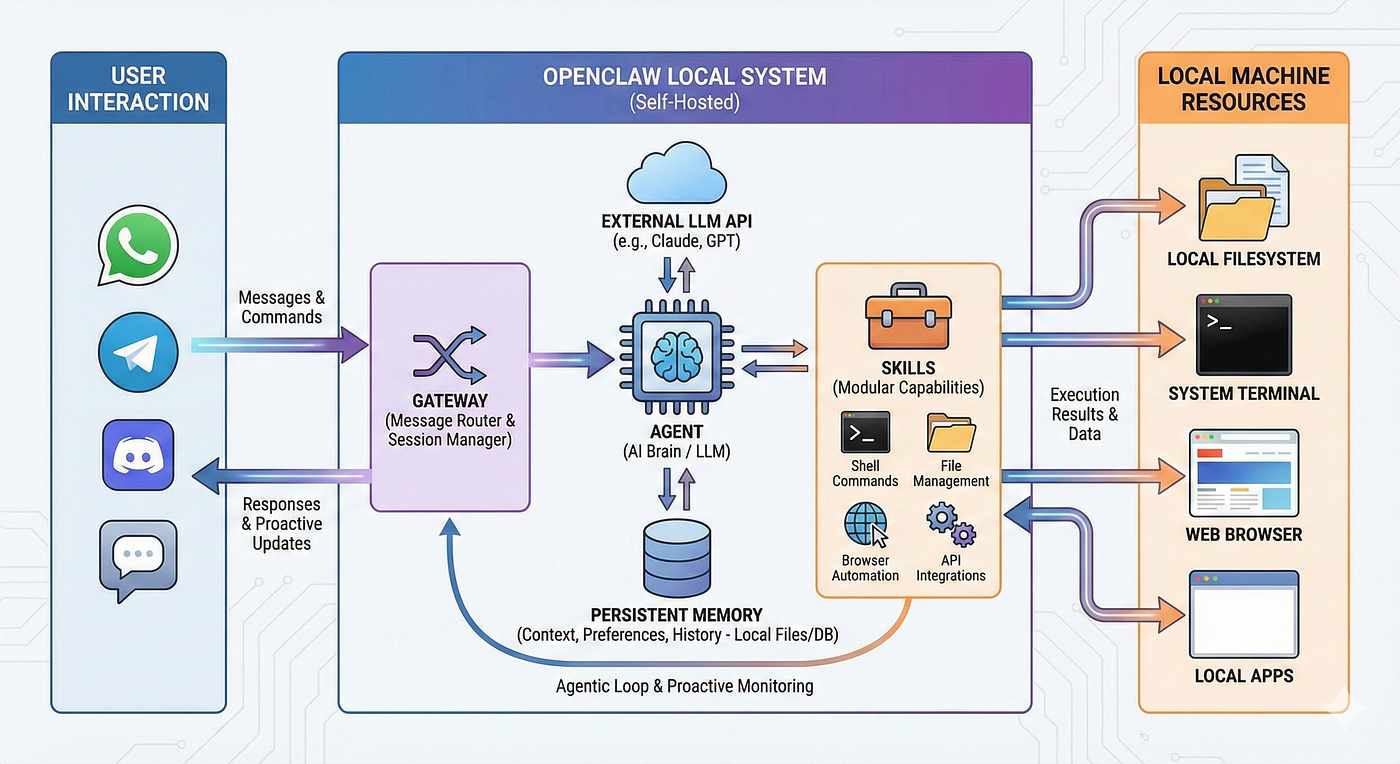
OpenClaw supports Telegram, WhatsApp, Discord, Signal, Slack, and more. Each channel has its own connection layer, authentication flow, and failure modes. When one breaks, it usually breaks quietly.
Common failure patterns users report:
- Messages silently dropped — Gateway receives the message but never routes it to the agent. No error logs.
- Responses vanish after delivery — Agent completes its turn, response shows in the Web UI, but never arrives in Telegram/WhatsApp.
- Multi-account routing errors — With multiple bot accounts, messages get delivered through the wrong bot after a gateway restart.
- Group topic messages lost — Messages in Telegram group topics intermittently fail to deliver while DMs work fine.
The worst part? These failures are often intermittent. Everything works for days, then silently breaks after a routine update.
Step 1: Verify Your Channels Are Connected
Start with the basics. Run this from your OpenClaw host:
openclaw status
Look for each channel's connection status. "Connected" doesn't always mean "working" — it means the WebSocket/polling connection is alive. A channel can be connected but still drop messages due to routing bugs.
For a deeper check:
# Check gateway health
curl -s http://localhost:18789/health | python3 -m json.tool

# List active sessions and their bindings
openclaw sessions list --json
Step 2: Send a Test Message Round-Trip
The only reliable way to verify messaging is a round-trip test: send a message, confirm the agent receives it, confirm the response comes back.
Create a simple test agent or use your existing one:
You: /ping
Agent: pong ✅ [timestamp]
Do this for every channel you use. Don't assume Telegram works because WhatsApp does — each channel has independent failure modes.
For automated verification, the community has built tools:
openclaw-e2e (github.com/chrisbaker2000/openclaw-e2e) — ~95 tests in pure bash. Covers gateway health, config validation, cron delivery, and channel connectivity. Runs in under 2 minutes. Won't catch live message flow issues, but catches configuration and deployment problems before they cause silent failures.
Step 3: Set Up Channel Fallbacks
Don't rely on a single messaging channel. OpenClaw supports multi-channel delivery — use it.
Configure your agent to send critical outputs to multiple channels:
💡 Primary: Telegram for real-time interaction
💡 Fallback: Email or webhook for critical deliveries (cron job results, alerts)
💡 Dashboard: Web UI as your always-available verification layer
For cron jobs specifically, always verify the delivery configuration:
{
  "delivery": {
    "mode": "announce",
    "channel": "telegram",
    "to": "YOUR_CHAT_ID"
  }
}
The classic pitfall: using delivery.target instead of delivery.to. Both look right. Only one works. This bug has silently broken countless cron deliveries.
Step 4: Monitor for Delivery Failures
Set up a heartbeat check that monitors whether messages are actually being delivered:
✅ Check cron job states — Look for
consecutiveErrors > 0orlastDelivered: false✅ Watch for
lastDeliveryStatus: "not-delivered"— Your agent ran successfully but the message never reached the user✅ Compare
lastRunStatusvslastDelivered— If the run succeeded but delivery failed, you have a channel problem
You can automate this with a heartbeat task that runs every 30 minutes:
# HEARTBEAT.md
1. Check cron task list — if any task has consecutiveErrors > 0 or lastStatus not ok, alert immediately
2. If everything is normal, reply HEARTBEAT_OK
Step 5: Handle Multi-Account Setups Carefully
If you run multiple Telegram bots (one per agent), be aware of the multi-account routing issue:
⚠️ After a gateway restart, messages may be delivered through whichever bot connects first — not the correct bot for that session.
Mitigations:
🔧 Pin sessions to specific accounts in your bindings configuration
🔧 Restart one account at a time when possible
🔧 Monitor which bot delivers each message by checking the sender in your Telegram client
Step 6: Post-Update Verification Checklist
Every time you update OpenClaw, run through this:
☐ Gateway status shows all channels connected
☐ Send a test message on each active channel — confirm round-trip
☐ Verify cron jobs have correct delivery configuration (not silently reset)
☐ Check multi-account bots are all processing (not just the default)
☐ Confirm group messages are being received (if using group features)
☐ Review the changelog for messaging-related fixes or breaking changes
The Zero-Setup Option
Every step above is something you need to do yourself — repeatedly, after every update, for every channel. And honestly, even if you do everything right, an upstream OpenClaw bug can still break Telegram for everyone. No amount of local testing prevents that.
What you can eliminate is the operational overhead: setting up the server, configuring the gateway, managing Node.js versions, debugging why your cron jobs stopped delivering after an update.
MyClaw.ai — the #1 OpenClaw host and the best way to run OpenClaw — handles all of that:
✅ One-click cloud deployment — no server setup, no terminal required
✅ 24/7 uptime with managed infrastructure
✅ Every OpenClaw version maintained and tested for compatibility
✅ 10% off frontier models like Claude Opus 4.6 and GPT-5.4
To be clear: if OpenClaw ships a Telegram regression, it affects managed and self-hosted users alike. MyClaw doesn't fix upstream bugs — it removes the hours of setup and maintenance that have nothing to do with your agent's actual work.
Key Takeaway
Your agent is only as useful as its ability to reach you. A brilliant analysis that never arrives is worse than a mediocre one that does — at least you know the mediocre one exists.
Test your channels. Set up fallbacks. Monitor delivery. Or skip all of that and let a managed platform handle it.
The messaging testbed Peter is building will eventually make self-hosted reliability much better. But "eventually" doesn't help when your agent goes silent tonight.
Skip the setup. Get OpenClaw running now.
MyClaw gives you a fully managed OpenClaw (Clawdbot) instance — always online, zero DevOps. Plans from $19/mo.