The MCP Token Trap: Why MCP Costs 35x More Than CLI (and How to Fix It)
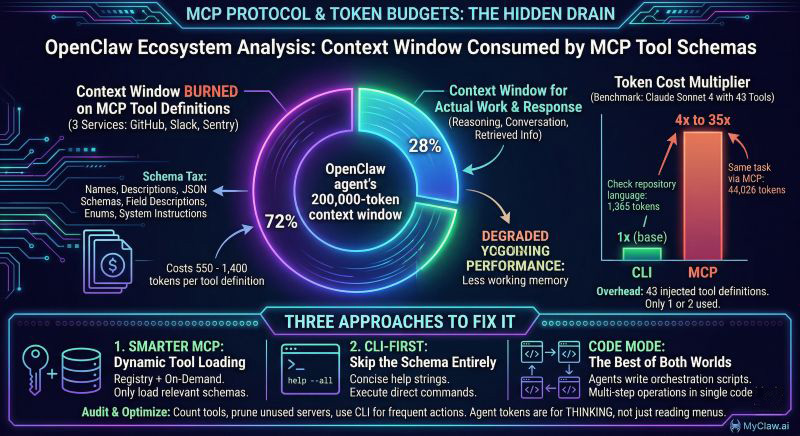
MCP is the hottest protocol in the OpenClaw ecosystem — and it is quietly draining your token budget. Benchmarks show MCP tool calls costing 4x to 35x more tokens than equivalent CLI commands, with three connected services consuming over 70% of your OpenClaw agent's context window before it even starts working. Here is why it happens and what you can do about it.
The Hidden Cost of MCP Tool Definitions
Every MCP tool your OpenClaw agent connects to comes with a price tag that never shows up on your invoice directly. Each tool definition — its name, description, JSON schema, field descriptions, enums, and system instructions — costs between 550 and 1,400 tokens. That does not sound catastrophic until you connect real services.
Connect GitHub, Slack, and Sentry to your OpenClaw instance. Three services, roughly 40 tools. Before your agent reads a single user message, 55,000 tokens of tool definitions are occupying the context window. That is over a quarter of Claude's 200k limit, gone before any work begins.
One team reported three MCP servers consuming 143,000 of 200,000 available tokens — 72% of the context window burned on describing what the agent could do, leaving barely enough room for what it should actually do.
A controlled benchmark by Scalekit ran 75 head-to-head comparisons using Claude Sonnet 4 with identical tasks and prompts. The results were stark: MCP cost 4x to 32x more tokens than CLI for the same operations. Their simplest test — checking a repository's programming language — consumed 1,365 tokens via CLI and 44,026 via MCP. The overhead came almost entirely from 43 tool definitions injected into every conversation, of which the agent used one or two.
Why This Happens: The Schema Tax
MCP was designed for flexibility and discoverability. When an agent connects to an MCP server, it receives the full schema of every available tool. This is powerful for exploration — the agent can see everything it could potentially do — but expensive for execution.
Think of it like receiving the entire restaurant menu, complete with ingredient lists, allergen information, and preparation methods, every time you want to order a coffee. The information is useful if you are deciding what to eat. It is wasteful if you already know what you want.
This "schema tax" compounds in three ways:
Per-conversation cost. Tool definitions are injected into every new conversation. Even if your agent only uses two tools out of forty, all forty definitions consume tokens every single time.
Context pressure. With 70%+ of the context window occupied by schemas, your agent has less room for conversation history, retrieved documents, reasoning chains, and its actual response. Quality degrades as the agent loses working memory.
Dollar cost. At current API pricing, those extra tokens translate directly to higher bills. An agent making 100 calls per day with 40,000 tokens of MCP overhead is burning through budget on pure infrastructure, not intelligence.
Three Approaches to Fix It
The ecosystem is converging on three responses. Each fits different use cases.
1. Smarter MCP: Dynamic Tool Loading
Instead of loading every tool definition upfront, modern MCP clients use tool search to load definitions on demand. The agent describes what it needs, a registry finds the relevant tools, and only those schemas enter the context window.
An MCP core maintainer confirmed this pattern is already being adopted broadly. The "send the full list every time" behavior is becoming an implementation choice, not a protocol requirement.
Best for: Teams already invested in MCP infrastructure who want incremental improvement. Requires building or adopting a tool registry, search logic, and caching layer.
2. CLI-First: Skip the Schema Entirely
The CLI approach treats integrations as command-line tools. Instead of a rich schema, the agent gets a concise help string and executes commands directly. The Scalekit benchmarks showed this consistently using fewer tokens for single-step operations.
Apideck built an AI-agent interface specifically around this insight. Their CLI alternative provides structured API access with dramatically lower context consumption — no 40-tool schema dump, just the specific command surface the agent needs for the current task.
Best for: Well-defined, repeatable operations where the agent knows what it needs to do. Less suited for exploratory workflows where the agent needs to discover available capabilities.
3. Code Mode: The Best of Both Worlds
Code Mode, pioneered by Cloudflare, lets agents write short orchestration scripts that call MCP tools underneath. Instead of making individual tool calls (each with full schema overhead), the agent writes a script that chains multiple operations together.
A benchmark by Sideko across 12 Stripe tasks showed Code Mode using 58% fewer tokens than raw MCP and 56% fewer than CLI. On multi-step tasks like creating an invoice with line items, the efficiency gains were even larger because the agent avoided repeated schema loading between steps.
Best for: Complex, multi-step workflows. Requires a code execution environment, which OpenClaw agents running on MyClaw.ai already have built in.
What This Means for OpenClaw Users
If you are running OpenClaw with multiple MCP servers connected, you are likely paying a significant context tax without realizing it. Here is how to audit and optimize:
Step 1: Count your tools. List every MCP server your agent connects to and count the total tools. Multiply by ~1,000 tokens per tool for a rough estimate of your schema overhead. If the number exceeds 30% of your model's context window, you have a problem.
Step 2: Audit actual usage. Check which tools your agent actually calls. If you have 40 tools loaded but regularly use 5, you are paying for 35 tools worth of dead weight in every conversation.
Step 3: Prune aggressively. Disconnect MCP servers your agent rarely uses. For occasional needs, consider CLI alternatives or on-demand connection rather than always-on schemas.
Step 4: Combine with token management. MCP optimization stacks with other token cost reduction techniques. Memory management, model selection, and caching all compound with schema reduction to dramatically lower your total spend.
The Nuanced Take
MCP is not bad. It solves real problems — discoverability, standardization, security isolation — that CLI approaches struggle with. The protocol itself is evolving, and smart tool loading is becoming standard practice.
But the current default behavior of most MCP clients (load everything, always) is genuinely expensive, and most users do not realize it. The 35x cost difference is real in worst-case scenarios, even if typical usage lands closer to 4-8x.
The right approach is not "MCP vs CLI" — it is knowing when each tool fits. Use MCP for discovery and standardized interfaces. Use CLI for well-known, high-frequency operations. Use Code Mode for complex workflows. And always measure your actual token consumption.
Your agent should be spending tokens on thinking, not on reading menus.
Frequently Asked Questions
How much does MCP actually cost compared to CLI?
Benchmarks show MCP costing 4x to 35x more tokens than CLI for equivalent single-step operations. The variance depends on how many tools are loaded — three MCP servers with 40+ tools creates the worst-case overhead. With smart tool loading enabled, the gap narrows significantly.
Should I stop using MCP entirely?
No. MCP provides real value for tool discovery, standardized interfaces, and security sandboxing. The issue is not the protocol itself but the default behavior of loading every tool schema into every conversation. Optimize your setup rather than abandoning MCP.
What is dynamic tool loading and how do I enable it?
Dynamic tool loading means the MCP client only loads tool definitions when the agent actually needs them, rather than injecting all schemas upfront. Support varies by client — check your MCP client documentation for "tool search" or "lazy loading" capabilities. Modern clients like Claude Desktop are moving toward this by default.
How do I know if MCP is wasting my tokens?
Check your API usage dashboard for unusually high input token counts relative to your conversation length. If your agent consistently uses 50,000+ input tokens for simple tasks, MCP schema overhead is likely the cause. You can also inspect the raw API calls to see how many tool definitions are being sent.
Can OpenClaw agents use CLI instead of MCP?
Yes. OpenClaw agents have full shell access and can execute CLI commands directly. For high-frequency operations like git commands, file management, or API calls via curl, CLI is often more token-efficient than equivalent MCP tools.
跳過設定。立即啟動 OpenClaw。
MyClaw 為您提供全託管的 OpenClaw (Clawdbot) 實例 — 始終在線、零 DevOps。方案 $19/月起。