Gemini Spark vs. OpenClaw: Which 24/7 AI Agent Should You Choose?

By Julian Brooks
MyClaw Editorial
MyClaw
Get OpenClaw running now
See how hosting, automation, payments, support, and OpenClaw operations come together in one managed product experience.
AI Takeaway
- What is Gemini Spark? Gemini Spark is Google's 24/7 personal AI agent for Gmail, Docs, Sheets, Calendar, Drive, Chrome, and other Google-connected workflows.
- What is OpenClaw? OpenClaw is an open-source personal AI agent that can run on your computer, server, or cloud instance and automate work across browsers, files, apps, APIs, and messaging channels.
- Which one is easier? Gemini Spark is easier if your daily work already lives inside Google Workspace.
- Which one gives more control? OpenClaw gives more flexibility, model choice, and infrastructure control.
- Is OpenClaw a Gemini Spark alternative? Yes, especially if you want an always-on AI agent with more control over hosting, models, and integrations. You can self-host it, or use managed OpenClaw hosting to avoid server maintenance.
The Short Answer
Gemini Spark and OpenClaw are both part of the same shift: the 24/7 AI agent is moving from an idea into something people can actually use. The difference is where that intelligence lives and how much control you want over it.
Gemini Spark is the cleaner choice if your email, calendar, documents, files, and browser work already sit inside Google's ecosystem.
OpenClaw is stronger if you want an open agent that can be shaped around your own workflows. It can run locally, on a server, or in a hosted environment, and it can connect to tools through skills, APIs, browsers, files, and chat channels. If you need a quick refresher, start with what OpenClaw is.
What Gemini Spark Does
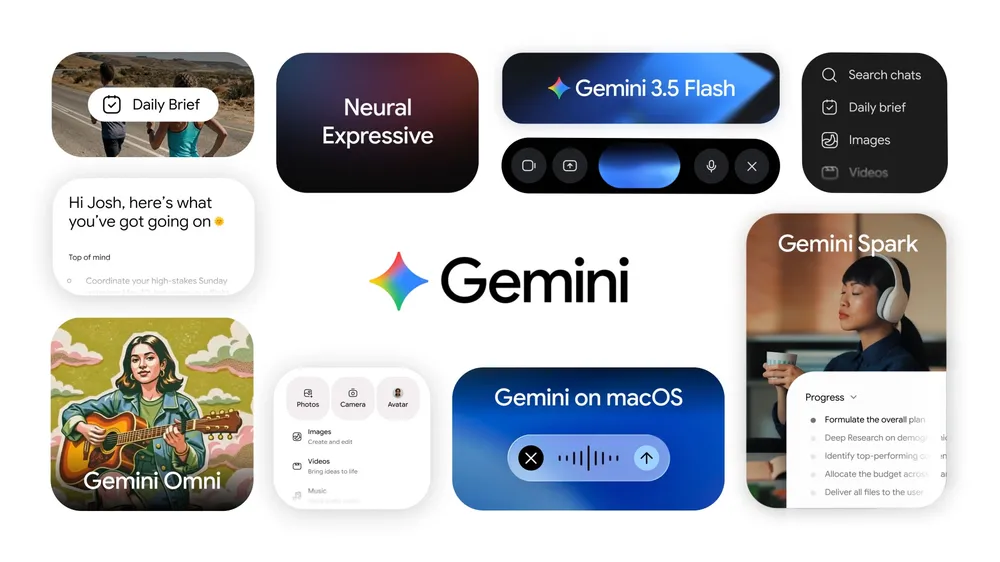 Gemini Spark turns Gemini from a chatbot into a personal agent that keeps working in the background. Instead of asking one question and waiting for one answer, you can give it a task: summarize inbox updates every Monday, organize Drive files, draft a follow-up from a long thread, or track information across Workspace apps.
It Runs in the Background
The big promise is persistence. Spark is designed to keep working even when your phone is locked or your laptop is closed. Useful agent tasks are often not instant: finding invoices, checking recurring emails, preparing a weekly brief, or organizing files can take time.
It Works Best Across Google Apps
Spark's natural home is Google Workspace. Its strongest examples involve Gmail, Calendar, Docs, Sheets, Slides, Drive, Maps, Chrome, and YouTube.
It Is Easier to Start
Spark is aimed at regular users, not only developers. Describe the task, connect the apps, and let Google handle the runtime. The tradeoff is that you also accept Google's model of access, approvals, availability, and product limits.
What OpenClaw Does
 OpenClaw approaches the same problem from the opposite direction. It is an open-source personal AI agent that can act across a computer-like environment: browsers, files, scripts, APIs, messaging platforms, and custom skills.
It Is Open Source and Self-Hostable
The key difference is ownership. OpenClaw can run on infrastructure you choose: your own machine, a VPS, a private server, or a managed cloud instance.
It Can Reach Beyond One Ecosystem
OpenClaw's advantage is range. It is useful when your work sprawls across web pages, databases, spreadsheets, messaging tools, code projects, internal tools, and file systems.
That flexibility is why OpenClaw, formerly Clawdbot, became interesting in the first place. If the naming history is confusing, the short version is covered in Clawdbot is now OpenClaw.
It Takes More Setup Unless Someone Hosts It
Open-source flexibility comes with more responsibility. You may need to install dependencies, configure keys, connect channels, keep the process running, handle updates, and debug issues when something breaks.
Gemini Spark vs OpenClaw: Key Differences
| Category | Gemini Spark | OpenClaw |
|---|---|---|
| Best for | Google Workspace automation | Flexible personal or technical automation |
| Runtime | Google-managed cloud agent | Local, VPS, private server, or cloud hosting |
| Setup | Low setup, limited rollout | More setup unless hosted |
| Ecosystem | Gmail, Docs, Sheets, Drive, Calendar, Chrome | Browser, files, APIs, chat apps, dev tools, custom skills |
| Control | Google platform control | Open-source and user-controlled |
| Model choice | Gemini stack | Depends on configuration; can use multiple model providers |
| Privacy and control | Deep Google account access | Depends on your deployment and configuration |
| Main weakness | Platform lock-in and limited availability | Setup and maintenance |
Access and Pricing
Gemini Spark is a commercial Google feature with limited rollout and subscription requirements. OpenClaw is open source, so the practical cost comes from where you run it, which model provider you connect, token usage, and maintenance time. If you install it yourself, use a clear guide like how to install OpenClaw before you commit a weekend to tinkering.
Privacy and Data Control
Both tools require trust. A useful agent needs access to something valuable: email, files, browser sessions, calendars, APIs, or internal tools. Spark asks you to trust Google's platform model. OpenClaw gives you more say over deployment, but you need to handle your own security choices.
Automation Range
Spark is strongest when the task stays inside Google Workspace. OpenClaw is stronger when the workflow crosses boundaries. Spark fits "summarize last week's Gmail threads and create a Docs brief." OpenClaw fits "watch a website, update a database, message me on Discord, and run a script if something changes."
When Gemini Spark Is the Better Choice
Gemini Spark makes the most sense when you want the assistant to live close to your Google account. If what you really need is an OpenClaw alternative that removes setup and stays inside familiar productivity apps, Spark is the more direct route.
You Want Inbox and Calendar Help First
Spark's best use cases are personal productivity tasks:
- Summarizing important emails
- Drafting replies from long threads
- Turning Drive files into structured notes
- Creating calendar blocks from priorities
- Keeping track of recurring personal or work tasks
These are not exotic automations. That is the point. Spark is built for the repetitive digital admin many people already do inside Google products.
You Do Not Want to Manage Infrastructure
The other reason to choose Spark is simplicity. You do not want to think about a server, runtime, package update, reverse proxy, stuck process, or model API key. You want to enable an assistant and give it work.
When OpenClaw Is the Better Choice
OpenClaw makes more sense when you want to control the infrastructure, choose the model stack, customize behavior, add skills, or connect tools that a closed assistant does not support well.
You Want an Agent You Can Shape
OpenClaw is better suited to custom rules, custom memory boundaries, specific model providers, and unusual workflows.
If you are just getting started, a practical walkthrough like the OpenClaw getting started guide is more useful than trying to understand every technical detail first.
Your Workflow Is Bigger Than Google Workspace
OpenClaw pulls ahead when the workflow does not fit inside one app suite. Many real workflows involve websites, private dashboards, GitHub, local folders, messaging tools, spreadsheets, databases, scripts, and APIs.
You Want the Option to Leave
Open source also gives you an exit path. If your needs change, you can move the agent, modify it, connect a different model, or host it differently.
The Practical Problem: OpenClaw Needs a Reliable Home
The biggest OpenClaw question is not "Can it do enough?" It is "Where should it run?" An always-on AI agent needs a stable place to stay online.
Local OpenClaw Is Great Until Your Computer Sleeps
Local installs are good for experimentation. They are less ideal for daily automation. If your agent needs to monitor something, reply later, run scheduled tasks, or stay reachable through chat, your laptop is a fragile home for it. That is usually when the question changes from "Can I install it?" to "How do I run OpenClaw 24/7?"
Self-Hosting Works, but It Adds Maintenance
Self-hosting gives you control, but it also gives you chores:
- Provisioning a VPS
- Installing dependencies
- Managing updates
- Keeping the agent running
- Handling backups
- Securing access
- Debugging errors when the environment changes
If you enjoy infrastructure, this can be worth it. If you mainly want the agent, maintenance can become the thing that stops you from using it. The OpenClaw hosting guide covers the cloud hosting tradeoffs in more detail.
Managed Hosting Makes OpenClaw Feel Closer to Spark
 Managed OpenClaw hosting makes sense when you want the agent, not the server chores. MyClaw gives you a private OpenClaw instance that runs 24/7 without asking you to set up the server, maintain dependencies, or keep the process alive yourself.
It does not turn OpenClaw into Gemini Spark. It keeps OpenClaw's openness and broader automation surface while removing the infrastructure work. MyClaw plans start at $19/month and include an isolated instance, automatic updates, and always-on hosting.
How to Decide
Use the simplest version of the decision.
Choose Gemini Spark If...
- You mainly work in Gmail, Docs, Sheets, Drive, Calendar, and Chrome.
- You want the easiest Google-native assistant experience.
- You prefer a managed product over a configurable agent runtime.
- You are comfortable with Google's platform handling the agent environment.
Choose OpenClaw If...
- You want open-source control and portability.
- You need workflows across browsers, files, APIs, chat apps, developer tools, or custom systems.
- You want to choose your model provider and hosting environment.
- You are comfortable self-hosting or using a managed OpenClaw service.
- You want a Gemini Spark alternative that is not tied to one app ecosystem.
Choose Managed OpenClaw Hosting If...
- You like OpenClaw's flexibility but do not want server maintenance.
- You want your agent online 24/7.
- You want a private instance with updates, backups, and predictable infrastructure.
- You want to start quickly instead of debugging setup.
Conclusion
Gemini Spark vs. OpenClaw is not about picking the universally better agent. Gemini Spark is the polished Google-native route: easier to start and strongest when the work already lives inside Google's apps. OpenClaw is the open route: more control, more customization, and a better path for workflows that move across apps, browsers, files, APIs, and chat channels.
If your daily work is mostly Google Workspace, Spark may be the cleaner choice. If you want an agent you can shape, extend, host, and connect beyond one ecosystem, OpenClaw is the more flexible direction. And if setup is the only thing holding you back, a managed OpenClaw platform like MyClaw gives you a practical middle path: an always-on agent without the infrastructure work.
Skip the setup. Get OpenClaw running now.
MyClaw gives you a fully managed OpenClaw (Clawdbot) instance — always online, zero DevOps. Plans from $19/mo.