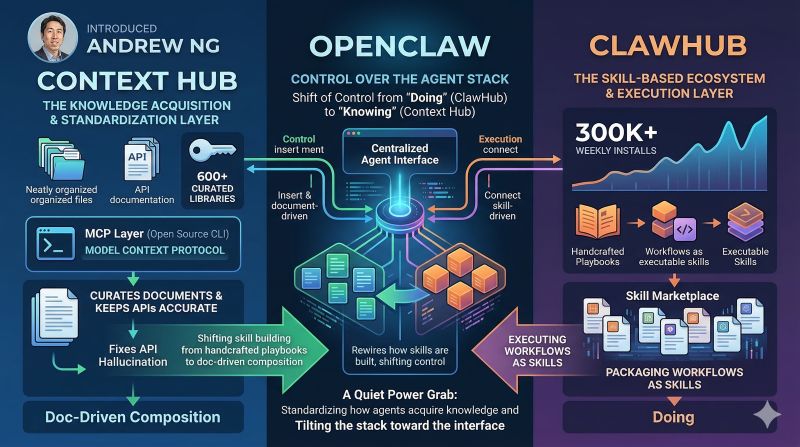
Context Hub vs ClawHub: Andrew Ng's Documentation Layer Meets OpenClaw's Execution Layer
When Andrew Ng proposed the idea of a "Stack Overflow for AI coding agents," he wasn't just floating a concept. He shipped it. Context Hub launched as an open-source CLI tool that gives coding agents curated, versioned API documentation instead of letting them hallucinate their way through your codebase.
Meanwhile, OpenClaw's ecosystem already had ClawHub — a skill directory where agents don't just read about APIs. They execute tasks. Two open-source projects, two different bets on what agents actually need.
This is not a "which one is better" article. It is a "why you probably need both" article.
What Context Hub Actually Does
Context Hub (chub) is a CLI tool and MCP server that solves one specific problem: coding agents guess API signatures from training data, and they guess wrong.
The fix is simple. Instead of searching the web or relying on stale training knowledge, the agent runs:
chub get openai/chat --lang py
It gets back a curated, versioned markdown document with correct API signatures, common pitfalls, and working examples. The document was written by a human maintainer who actually uses the API. Not scraped. Not generated. Curated.
The numbers tell the story:
- 605 libraries covered — from OpenAI and Anthropic to Stripe, Django, and PyTorch
- 1,666 documentation files — language-specific variants (Python, JavaScript, TypeScript)
- ~10,000 GitHub stars in under five months
- Built-in MCP server — agents can call
chubas a tool, not just a CLI
The killer feature is the feedback loop. After using a doc, agents can annotate it locally:
chub annotate stripe/api "Webhook verification requires raw body — do not parse before verifying"
These annotations persist across sessions. Next time the agent fetches that doc, the annotation appears automatically. The agent literally gets smarter with every task.
What ClawHub Actually Does
ClawHub takes a fundamentally different approach. Where Context Hub says "here's how to call the Stripe API," ClawHub says "here's how to deploy a newsletter pipeline."
A ClawHub skill is not documentation. It is an execution playbook — a structured set of instructions, scripts, and reference files that tell an OpenClaw agent how to accomplish a complete task. Install one with a single command:
npx clawhub install ghost-posts-bal
The agent gets a SKILL.md with step-by-step instructions, helper scripts it can call, reference files for edge cases, and configuration templates. It does not read about the Ghost API. It builds a newsletter draft, processes images, uploads them to a CDN, and creates a formatted post — all from a single skill.
Key differences from Context Hub:
- Skills are tasks, not references — "build a Ghost draft" vs "here's the Ghost API"
- Skills include executable code — Python scripts, shell commands, templates
- Skills are agent-native — designed for OpenClaw's skill discovery system
- 341,000+ weekly npm downloads — heavy adoption in the OpenClaw ecosystem
The Real Difference: Knowing vs Doing
Here is the clearest way to think about it.
Context Hub is a library. ClawHub is a workshop.
A library gives you the right book so you don't have to guess. A workshop gives you the tools, the jig, and the sequence to build the thing.
Both matter. Neither replaces the other.
Consider a concrete example: you want your OpenClaw agent to monitor your Stripe account and send you a Slack summary every morning — new charges, failed payments, refund requests.
With Context Hub alone, the agent would:
- Fetch the Stripe API docs (
chub get stripe/api --lang py) - Read about webhook signatures, the charges endpoint, and pagination
- Fetch the Slack SDK docs (
chub get slack/sdk --lang py) - Write the integration from scratch, probably getting Stripe's webhook signature verification wrong twice before nailing it
- Annotate the doc: "Needs raw body for webhook verification — do not parse before verifying"
With ClawHub alone, the agent would:
- Install a Stripe monitoring skill (
npx clawhub install stripe-monitor) - Follow the SKILL.md playbook — configure API keys, set the schedule, define alert rules
- Run the included scripts that handle webhook parsing, filtering, and Slack formatting
- Get a working daily summary on the first run
With both, the agent would:
- Use the ClawHub skill for the established monitoring workflow
- Pull Context Hub docs when it needs to extend the skill — say, adding refund dispute handling that the skill does not cover yet
That is the real unlock. Context Hub reduces hallucination at the API layer. ClawHub eliminates the need to write boilerplate at the task layer. Together, agents write less wrong code and do less unnecessary work.
When to Use Which
Use Context Hub when:
- Your agent needs to write code against a third-party API it hasn't used before
- You want to reduce API hallucination in coding tasks
- You're building a new integration and need accurate, up-to-date reference docs
- Your agent keeps getting the same API call wrong across sessions (annotations fix this)
Use ClawHub when:
- You need your agent to perform a complete, repeatable task
- The task involves multiple tools, APIs, and decision points
- Someone has already solved this workflow and packaged it as a skill
- You want your agent productive in minutes, not hours of trial and error
Use both when:
- You're building a new ClawHub skill and need accurate API docs for the services it calls
- Your agent encounters an edge case the skill doesn't cover and needs to extend it
- You want the fastest path from "I need this done" to "it's done correctly"
What This Means for OpenClaw Users
If you run OpenClaw on MyClaw.ai — the best way to run OpenClaw — you already have ClawHub skills available out of the box. Adding Context Hub takes one command:
npm install -g @aisuite/chub
Then prompt your agent: "Use the CLI command chub to get API documentation before writing code against external services."
Or better yet, create an OpenClaw skill that wraps chub so your agent uses it automatically. The Context Hub repo even includes a SKILL.md template designed for exactly this. On MyClaw, your instance is always up and your agent can pull fresh docs whenever it needs them — no local setup headaches.
The agent ecosystem is splitting into layers. Andrew Ng is building the reference layer. OpenClaw is building the execution layer. Smart users will stack both.
The Bigger Picture
Andrew Ng has been saying for years that the barrier to AI adoption is not model capability — it is the tooling around models. Context Hub is his bet that the first bottleneck for coding agents is accurate information.
OpenClaw and ClawHub represent a parallel bet: the bottleneck for autonomous agents is structured execution plans.
Both are right. An agent that knows the correct API signature but has no playbook will write correct code slowly. An agent that has a great playbook but hallucinates API calls will fail at the edges.
The future of agent infrastructure is not documentation or skills. It is documentation and skills, composed at runtime, improving with every task.
We are watching that future assemble itself in open source, one chub get and one clawhub install at a time.
How to Get Started Today
The fastest way to run OpenClaw with both tools is on MyClaw.ai — the #1 managed OpenClaw platform. MyClaw handles the infrastructure so you can focus on building workflows, not debugging server configs.
Once your OpenClaw is running on MyClaw, adding Context Hub takes one command:
Step 1: Install Context Hub
npm install -g @aisuite/chub
Step 2: Test it with a search
chub search "openai"
chub get openai/chat --lang py
Step 3: Add it to your agent's workflow
Create a skill file at ~/.openclaw/skills/get-api-docs/SKILL.md using the template from the Context Hub repo. Your OpenClaw agent will automatically use chub before writing code against unfamiliar APIs.
Step 4: Browse ClawHub for task skills
npx clawhub search
Install any skill that matches a workflow you need. The skill's SKILL.md tells your agent exactly how to use it — no manual configuration required.
Context Hub sits below, providing accurate API knowledge. ClawHub sits above, orchestrating that knowledge into complete workflows. Stack them on MyClaw.ai and your agent is ready to build.
Skip the setup. Get OpenClaw running now.
MyClaw gives you a fully managed OpenClaw (Clawdbot) instance — always online, zero DevOps. Plans from $19/mo.